… that’s a statement in one of me email messages this morning.
Imagine, I’m starting my day and reviewing messages and posts over a cup of tea, when I read this rather angry filth desperate plea for help because “… apparently Ubuntu, and all of Linux is worthless, there is no hardware support for these crappy #$@*!+? OS’s! Hardly any hardware works on Ubuntu linux, it &%#$@ …” Ummm… let’s call this email writer “Joe”. (You know who you are.) 
Perhaps for all the Joe’s (myself included). Let’s dispel this myth shall we?
Personally, I’d like to clarify one thing. I do not believe that there is a single piece of hardware that does not work with Linux. (After all, ask “Steve”: He’s the “Super Villian”). Funny video links aside, I think a more accurate statement is that some hardware requires drivers to be written. And yes, I do concede that for now there may be more drivers readily available for other platforms, only because those platforms were adopted for desktop use by the general public, faster than Linux was - And as such, vendors wrote more drivers for them. 
That trend is clearly changing. Poor hardware support, as in “Hardly Any Hardware Works on Ubuntu Linux!”… I think not! I have only had one issue with drivers, I couldn’t get some Realtek network cards working, so I switched (easy). To be sure, I’ve posted about hardware before:
Ubuntu Hardware Compatability List (HCL)
Massive List of Laptops That Work With Ubuntu
After further reading online, it is very evident that the increasing adoption of Linux (at an increasing rate) on the desktop, is improving the quality and volume of hardware support for the end user. For example, Ubuntu Brainstorm has an active community providing valuable input for hardware support among other communities.
Additionally, “Joe” needs to be aware of the issue between a driver and software used to obtain functionality. I’ve personally encountered this issue with a WebCam: Linux Driver for Quickcam USB cameras - Logitech Quickcam Fusion, where I had trouble because of drivers and then a separate issue where I did not have some functionality because it (the functions) were not provided by the software I was using. And yes, it would have been easy to simply say the hardware does not work, but evidently, I got this “unsupported” hardware working. Mark Shuttleworth’s blog “here be dragons” clearly addresses this very aspect:
“…Solving this requires work at two levels - first there are possibly some drivers, and second there need to be relevant applications to manage the gadget’s content (music, photos, videos, GPS tracks, etc) and administer the gadget (firmware updates etc)…”
“…it’s all about critical mass. Once 5-10% of the people who buy these gadgets are running Linux (actually, a single brand of Linux), only then will the gadget manufacturers themselves start to care about it as a consumer platform for which their stuff should work. That goes for everything from cell phones, PDA’s, and smart phones to some of the more weird and wonderful things that people like to drive from a PC, like laser cutters and 3D printing machines. It’s partly just a matter of time, but then it’s also partly a question of how we communicate the state of Linux today…” You can read his full post here: http://www.markshuttleworth.com/archives/76
Now, for those looking for “currently” compatible hardware, I’ve listed some of the resources I use below. Hopefully, they will help you too. And if you’re reading, Joe… This list is for you too. Enjoy!
Hardwaredatenbank (German - Hardware Databank)
 I asked if he’s made sure to compact his folders from time to time? Answer: “No” - Bingo! That’s maybe why the email disappeared.
 If any of you are like me, I generally can fix something faster when I can see it, and very slowly when I cannot. Worse still is when the individual is trying to explain what he is looking at when he doesn’t even know! Often, I’d eventually hear an exasperated plea saying “Can’t it be like all the other Windows guys? All they have to do is boot-up and they are connected. They are joking about me”. Frustrating for him and me. Sound familiar to anyone?
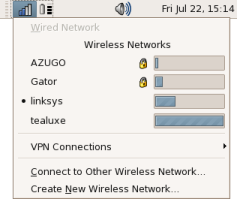 “Networking on Linux right now is painful for the mobile desktop user, especially in comparison to other operating systems. A laptop user should never need to use the command line or configuration files to manage their network; it should “Just Work” as automatically as possible and intrude as little as possible into the user’s workflow. NetworkManager attempts to make networking invisible. When moving into areas you’ve been before, NetworkManager automatically connects to the last network the user chose to connect to. Likewise, when back at the desk, NetworkManager will switch to the faster, more reliable wired network connection.” Read more details here:


